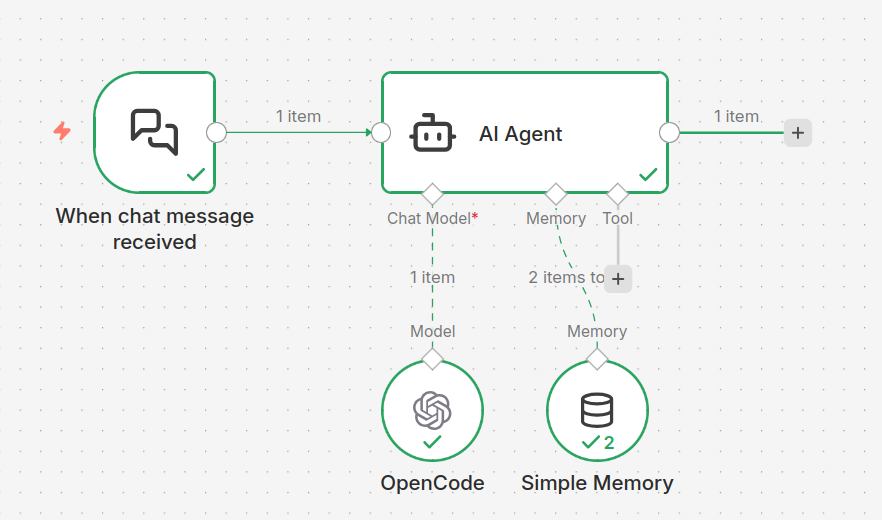
OpenCode
🚀Installation
Install By
Preliminary
1. Kubernetes has installed, if not check 🔗link2. Helm has installed, if not check 🔗link3. ArgoCD has installed, if not check 🔗link1.prepare `opencode-configuration.yaml`
Details
kubectl get namespaces opencode > /dev/null 2>&1 || kubectl create namespace opencode

kubectl -n opencode create secret generic opencode-server-secret \
  --from-literal=OPENCODE_SERVER_PASSWORD=$(tr -dc A-Za-z0-9 </dev/urandom | head -c 16)
1.1.choose different LLM configuration
kubectl -n opencode apply -f - <<'EOF'
apiVersion: v1
kind: ConfigMap
metadata:
  name: opencode-config
data:
  opencode.json: |
    {
      "provider": {
        "openai": {
          "options": {
            "baseURL": "https://v2.qixuw.com/v1",
            "apiKey": "sk-ss"
          },
          "models": {
            "gpt-5.3-codex-spark": {
              "name": "GPT-5.3 Codex Spark",
              "limit": {
                "context": 128000,
                "output": 32000
              },
              "options": {
                "store": false
              },
              "variants": {
                "low": {},
                "medium": {},
                "high": {},
                "xhigh": {}
              }
            }
          }
        }
      },
      "mcp": {
        "euclid-catalog": {
          "type": "remote",
          "url": "https://catalog.euclid.mcp.ay.dev:32443/sse",
          "enabled": true
        },
        "astro_k3s_mcp": {
          "type": "remote",
          "url": "http://eva24002-entrance.lab.zverse.space:30082/mcp",
          "enabled": true,
          "oauth": false,
          "timeout": 15000
        }
      },
      "agent": {
        "build": {
          "options": {
            "store": false
          }
        },
        "plan": {
          "options": {
            "store": false
          }
        }
      },
      "$schema": "https://opencode.ai/config.json"
    }
EOF
kubectl -n opencode apply -f - <<'EOF'
apiVersion: v1
kind: ConfigMap
metadata:
name: opencode-config
data:
opencode.json: |
{
"$schema": "https://opencode.ai/config.json",
"provider": {
"minimax": {
"npm": "@ai-sdk/openai-compatible",
"name": "MiniMax M2.5",
"options": {
"baseURL": "http://10.200.92.41:31551/v1",
"apiKey": "sk-sss"
},
"models": {
"minimax-m2.5": {
"name": "MiniMax M2.5",
"id": "MiniMaxAI/MiniMax-M2.5",
"limit": {
"context": 196608,
"output": 8192
}
}
}
}
},
"model": "minimax/minimax-m2.5"
}
EOFkubectl -n opencode apply -f - <<'EOF'
apiVersion: v1
kind: ConfigMap
metadata:
name: opencode-config
data:
opencode.json: |
{
"$schema": "https://opencode.ai/config.json",
"model": "opencode/minimax-m2.5-free",
"small_model": "opencode/minimax-m2.5-free"
}
EOF2.prepare `deploy-opencode.yaml` ; change default model when you apply different configmap
Details
kubectl -n argocd apply -f - <<'EOF'
apiVersion: argoproj.io/v1alpha1
kind: Application
metadata:
  name: opencode
  namespace: argocd
spec:
  project: default
  source:
    repoURL: oci://ghcr.io/aaronyang0628/opencode
    targetRevision: 0.20.0
    chart: opencode
    helm:
      values: |
        image:
          repository: ghcr.io/nimbleflux/opencode-docker
          tag: 1.2.26
          pullPolicy: Always
        replicaCount: 1
        command:
          - opencode
        args:
          - serve
          - --port
          - "4000"
          - --hostname
          - "0.0.0.0"
        service:
          type: ClusterIP
          port: 4000
        env:
          OPENCODE_PORT: "4000"
        extraVolumes:
          - name: opencode-config
            configMap:
              name: opencode-config
        extraVolumeMounts:
          - name: opencode-config
            mountPath: /home/opencode/.config/opencode/opencode.json
            subPath: opencode.json
            readOnly: true
        persistence:
          enabled: true
          storageClass: local-path
          config:
            enabled: false
          data:
            enabled: true
            size: 1Gi
          workspace:
            enabled: true
            size: 5Gi
          playbook:
            enabled: true
            mountPath: /home/opencode/workspace/playbook
            example:
              enabled: true
        resources:
          requests:
            cpu: 500m
            memory: 1Gi
          limits:
            cpu: 2
            memory: 4Gi
        probes:
          liveness:
            tcpSocket:
              port: 4000
            initialDelaySeconds: 15
            periodSeconds: 30
          readiness:
            tcpSocket:
              port: 4000
            initialDelaySeconds: 10
            periodSeconds: 10
          startup:
            tcpSocket:
              port: 4000
            initialDelaySeconds: 5
            periodSeconds: 5
            failureThreshold: 30
        ingress:
          enabled: true
          className: nginx
          annotations:
            kubernetes.io/ingress.class: nginx
            cert-manager.io/cluster-issuer: self-signed-ca-issuer
            nginx.ingress.kubernetes.io/proxy-connect-timeout: "600"
            nginx.ingress.kubernetes.io/proxy-send-timeout: "300"
            nginx.ingress.kubernetes.io/proxy-read-timeout: "600"
            nginx.ingress.kubernetes.io/proxy-body-size: "50m"
            nginx.ingress.kubernetes.io/upstream-keepalive-connections: "50"
            nginx.ingress.kubernetes.io/upstream-keepalive-timeout: "60"
          hosts:
            - host: opencode.ay.dev
              paths:
                - path: /
                  pathType: Prefix
          tls:
          - hosts:
            - opencode.ay.dev
            secretName: opencode.ay.dev-tls
        globalLabels:
          app.kubernetes.io/part-of: opencode
          environment: production
        bridge:
          enabled: true
          image:
            repository: crpi-wixjy6gci86ms14e.cn-hongkong.personal.cr.aliyuncs.com/ay-dev/opencode-bridge
            tag: "v20260326r4"
          env:
            defaultModel: "opencode/minimax-m2.5-free"
            openaiStreamChunkSize: "4"
            openaiStreamChunkDelayMs: "10"
            enableLeadingEchoFilter: "false"
          resources:
            limits:
              cpu: 500m
              memory: 256Mi
            requests:
              cpu: 100m
              memory: 128Mi
          ingress:
            enabled: true
            annotations:
              kubernetes.io/ingress.class: nginx
              cert-manager.io/cluster-issuer: self-signed-ca-issuer
              nginx.ingress.kubernetes.io/proxy-buffering: "off"
              nginx.ingress.kubernetes.io/proxy-request-buffering: "off"
              nginx.ingress.kubernetes.io/proxy-connect-timeout: "300"
              nginx.ingress.kubernetes.io/proxy-send-timeout: "300"
              nginx.ingress.kubernetes.io/proxy-read-timeout: "600"
              nginx.ingress.kubernetes.io/proxy-body-size: "50m"
              nginx.ingress.kubernetes.io/upstream-keepalive-connections: "50"
              nginx.ingress.kubernetes.io/upstream-keepalive-timeout: "60"
            hosts:
              - host: opencode-bridge.ay.dev
                paths:
                  - path: /
                    pathType: Prefix
            tls:
              - secretName: opencode-bridge-tls
                hosts:
                  - opencode-bridge.ay.dev

  destination:
    server: https://kubernetes.default.svc
    namespace: opencode
  syncPolicy:
    syncOptions:
      - CreateNamespace=true
      - ServerSideApply=true
EOF
3.sync by argocd
Details
argocd app sync argocd/opencode4.then you can talk with LLM with rest api
Details
curl -k -X POST https://opencode.ay.dev:32443/session \
-H "Content-Type: application/json" \
-d '{"model": "opencode/minimax-m2.5-free"}'

## {"id":"ses_30a879abeffe6KRC0Rmg4aPrmK","slug":"brave-eagle","version":"1.2.26","projectID":"global","directory":"/home/opencode/workspace","title":"New session - 2026-03-16T07:07:14.113Z","time":{"created":1773644834113,"updated":1773644834113}}
5.reuse the same session
Details
curl -k -X POST https://opencode.ay.dev:32443/session/ses_30a879abeffe6KRC0Rmg4aPrmK/message \
-H "Content-Type: application/json" \
-d '{"parts": [{"type": "text", "text": "你好"}]}'

## {"info":{"role":"assistant","time":{"created":1773644844131,"completed":1773644848700},"parentID":"msg_cf5788c12001RS4wX3hwMRe0If","modelID":"minimax-m2.5","providerID":"minimax","mode":"build","agent":"build","path":{"cwd":"/home/opencode/workspace","root":"/"},"cost":0,"tokens":{"total":10628,"input":10567,"output":61,"reasoning":0,"cache":{"read":0,"write":0}},"finish":"stop","id":"msg_cf5788c63001hBrorYejcHc1tO","sessionID":"ses_30a879abeffe6KRC0Rmg4aPrmK"},"parts":[{"type":"step-start","id":"prt_cf57899120016WXp4jT4AHeTiG","sessionID":"ses_30a879abeffe6KRC0Rmg4aPrmK","messageID":"msg_cf5788c63001hBrorYejcHc1tO"},{"type":"text","text":"<think>The user said \"你好\" which means \"Hello\" in Chinese. According to the instructions, I should be concise and direct. I should respond briefly without unnecessary preamble. Since this is a simple greeting, I can just respond with a greeting back.\n</think>\n\n你好!有什么可以帮你的吗?","time":{"start":1773644848689,"end":1773644848689},"id":"prt_cf5789913001dUZnoW9w63ThkC","sessionID":"ses_30a879abeffe6KRC0Rmg4aPrmK","messageID":"msg_cf5788c63001hBrorYejcHc1tO"},{"type":"step-finish","reason":"stop","cost":0,"tokens":{"total":10628,"input":10567,"output":61,"reasoning":0,"cache":{"read":0,"write":0}},"id":"prt_cf5789e35001dLGIXJb5WHizMX","sessionID":"ses_30a879abeffe6KRC0Rmg4aPrmK","messageID":"msg_cf5788c63001hBrorYejcHc1tO"}]}
Preliminary
1. Kubernetes has installed, if not check 🔗link2. Helm has installed, if not check 🔗link3. ArgoCD has installed, if not check 🔗link1.prepare `opencode-configuration.yaml`
Details
kubectl get namespaces opencode > /dev/null 2>&1 || kubectl create namespace opencode

kubectl -n opencode create secret generic opencode-server-secret \
  --from-literal=OPENCODE_SERVER_PASSWORD=$(tr -dc A-Za-z0-9 </dev/urandom | head -c 16)
2.prepare `deploy-opencode.yaml`
Details
kubectl -n argocd apply -f - <<'EOF'
apiVersion: argoproj.io/v1alpha1
kind: Application
metadata:
  name: opencode
  namespace: argocd
spec:
  project: default
  source:
    repoURL: oci://ghcr.io/aaronyang0628/opencode
    targetRevision: 0.20.0
    chart: opencode
    helm:
      values: |
        image:
          repository: ghcr.io/nimbleflux/opencode-docker
          tag: 1.2.26
          pullPolicy: Always
        replicaCount: 1
        command:
          - opencode
        args:
          - serve
          - --port
          - "4000"
          - --hostname
          - "0.0.0.0"
        service:
          type: ClusterIP
          port: 4000
        env:
          OPENCODE_PORT: "4000"
        extraVolumes:
          - name: opencode-config
            configMap:
              name: opencode-config
        extraVolumeMounts:
          - name: opencode-config
            mountPath: /home/opencode/.config/opencode/opencode.json
            subPath: opencode.json
            readOnly: true
        persistence:
          enabled: true
          storageClass: local-path
          config:
            enabled: false
          data:
            enabled: true
            size: 1Gi
          workspace:
            enabled: true
            size: 5Gi
          playbook:
            enabled: true
            mountPath: /home/opencode/workspace/playbook
            example:
              enabled: true
        resources:
          requests:
            cpu: 500m
            memory: 1Gi
          limits:
            cpu: 2
            memory: 4Gi
        probes:
          liveness:
            tcpSocket:
              port: 4000
            initialDelaySeconds: 15
            periodSeconds: 30
          readiness:
            tcpSocket:
              port: 4000
            initialDelaySeconds: 10
            periodSeconds: 10
          startup:
            tcpSocket:
              port: 4000
            initialDelaySeconds: 5
            periodSeconds: 5
            failureThreshold: 30
        ingress:
          enabled: true
          className: nginx
          annotations:
            kubernetes.io/ingress.class: nginx
            cert-manager.io/cluster-issuer: letsencrypt
            nginx.ingress.kubernetes.io/proxy-connect-timeout: "300"
            nginx.ingress.kubernetes.io/proxy-send-timeout: "300"
            nginx.ingress.kubernetes.io/proxy-read-timeout: "600"
            nginx.ingress.kubernetes.io/proxy-body-size: "50m"
            nginx.ingress.kubernetes.io/upstream-keepalive-connections: "50"
            nginx.ingress.kubernetes.io/upstream-keepalive-timeout: "60"
          hosts:
            - host: opencode.72602.online
              paths:
                - path: /
                  pathType: Prefix
          tls:
          - hosts:
            - opencode.72602.online
            secretName: opencode.72602.online-tls
        globalLabels:
          app.kubernetes.io/part-of: opencode
          environment: production
        bridge:
          enabled: true
          image:
            repository: crpi-wixjy6gci86ms14e.cn-hongkong.personal.cr.aliyuncs.com/ay-dev/opencode-bridge
            tag: "v20260326r4"
          env:
            defaultModel: "openai/gpt-5.3-codex-spark"
            openaiStreamChunkSize: "4"
            openaiStreamChunkDelayMs: "10"
            enableLeadingEchoFilter: "false"
          resources:
            limits:
              cpu: 500m
              memory: 256Mi
            requests:
              cpu: 100m
              memory: 128Mi
          ingress:
            enabled: true
            annotations:
              kubernetes.io/ingress.class: nginx
              cert-manager.io/cluster-issuer: letsencrypt
              nginx.ingress.kubernetes.io/proxy-buffering: "off"
              nginx.ingress.kubernetes.io/proxy-request-buffering: "off"
              nginx.ingress.kubernetes.io/proxy-connect-timeout: "300"
              nginx.ingress.kubernetes.io/proxy-send-timeout: "300"
              nginx.ingress.kubernetes.io/proxy-read-timeout: "600"
              nginx.ingress.kubernetes.io/proxy-body-size: "50m"
              nginx.ingress.kubernetes.io/upstream-keepalive-connections: "50"
              nginx.ingress.kubernetes.io/upstream-keepalive-timeout: "60"
            hosts:
              - host: opencode-bridge.72602.online
                paths:
                  - path: /
                    pathType: Prefix
            tls:
              - secretName: opencode-bridge-tls
                hosts:
                  - opencode-bridge.72602.online

  destination:
    server: https://kubernetes.default.svc
    namespace: opencode
  syncPolicy:
    syncOptions:
      - CreateNamespace=true
      - ServerSideApply=true
EOF
3.sync by argocd
Details
argocd app sync argocd/opencode4.then you can talk with LLM with rest api
Details
curl -s "https://opencode-bridge.72602.online/v1/models"

## {"id":"ses_30a879abeffe6KRC0Rmg4aPrmK","slug":"brave-eagle","version":"1.2.26","projectID":"global","directory":"/home/opencode/workspace","title":"New session - 2026-03-16T07:07:14.113Z","time":{"created":1773644834113,"updated":1773644834113}}
4.then you can talk with LLM with rest api
Details
curl -k -X POST https://opencode.72602.online/session \
-H "Content-Type: application/json" \
-d '{"model": "MiniMaxAI/MiniMax-M2.5"}'

## {"id":"ses_30a879abeffe6KRC0Rmg4aPrmK","slug":"brave-eagle","version":"1.2.26","projectID":"global","directory":"/home/opencode/workspace","title":"New session - 2026-03-16T07:07:14.113Z","time":{"created":1773644834113,"updated":1773644834113}}
5.reuse the same session
Details
curl -k -X POST https://opencode.72602.online/session/ses_30a879abeffe6KRC0Rmg4aPrmK/message \
-H "Content-Type: application/json" \
-d '{"parts": [{"type": "text", "text": "你好"}]}'

## {"info":{"role":"assistant","time":{"created":1773644844131,"completed":1773644848700},"parentID":"msg_cf5788c12001RS4wX3hwMRe0If","modelID":"minimax-m2.5","providerID":"minimax","mode":"build","agent":"build","path":{"cwd":"/home/opencode/workspace","root":"/"},"cost":0,"tokens":{"total":10628,"input":10567,"output":61,"reasoning":0,"cache":{"read":0,"write":0}},"finish":"stop","id":"msg_cf5788c63001hBrorYejcHc1tO","sessionID":"ses_30a879abeffe6KRC0Rmg4aPrmK"},"parts":[{"type":"step-start","id":"prt_cf57899120016WXp4jT4AHeTiG","sessionID":"ses_30a879abeffe6KRC0Rmg4aPrmK","messageID":"msg_cf5788c63001hBrorYejcHc1tO"},{"type":"text","text":"<think>The user said \"你好\" which means \"Hello\" in Chinese. According to the instructions, I should be concise and direct. I should respond briefly without unnecessary preamble. Since this is a simple greeting, I can just respond with a greeting back.\n</think>\n\n你好!有什么可以帮你的吗?","time":{"start":1773644848689,"end":1773644848689},"id":"prt_cf5789913001dUZnoW9w63ThkC","sessionID":"ses_30a879abeffe6KRC0Rmg4aPrmK","messageID":"msg_cf5788c63001hBrorYejcHc1tO"},{"type":"step-finish","reason":"stop","cost":0,"tokens":{"total":10628,"input":10567,"output":61,"reasoning":0,"cache":{"read":0,"write":0}},"id":"prt_cf5789e35001dLGIXJb5WHizMX","sessionID":"ses_30a879abeffe6KRC0Rmg4aPrmK","messageID":"msg_cf5788c63001hBrorYejcHc1tO"}]}
1. following the steps in `https://opencode.ai`
Details
curl -fsSL https://opencode.ai/install | bash6.use bridge to manage session